
Automated data migration for Dynamics 365 can deliver a stronger return on investment (ROI) than custom extract, transform, and load (ETL) processes when a project involves complex mappings, changing requirements, poor data quality, or repeated testing. The main savings often come not from transferring records faster, but from reducing rework and making migration cycles easier to repeat and control.
For smaller migrations with straightforward transformations and stable requirements, existing SQL scripts, SQL Server Integration Services (SSIS), Azure Data Factory, and Dynamics 365 data management tools may be enough. The right choice depends on the full cost of getting data ready for business use—not simply the cost of the first load.
Key takeaways
- Compare total delivery costs, including discovery, mapping, cleansing, validation, testing, rework, training, licensing, and setup.
- Automation creates the most value when migration logic and testing activities must be repeated across multiple cycles or deployments.
- Dynamics 365 and common ETL tools already automate many migration tasks, so a specialist platform should demonstrate additional measurable value.
- Use project-specific assumptions to calculate cost reduction, break-even, and ROI. Treat illustrative calculations as a model, not a guarantee.
- Protect sensitive data and retain human oversight of business-critical mapping, reconciliation, and go-live decisions.
Automated data migration vs. custom ETL: What is the difference?
“Manual ETL” does not necessarily mean that people move records by hand. A custom ETL approach can use scripts, SSIS, Azure Data Factory, and other existing tools to extract source data, transform it, and load it into a target system. Dynamics 365 Finance and Supply Chain Management also provides a Data Management Framework (DMF) that supports data entities, staging, mapping, import and export packages, and recurring jobs.
A specialist Dynamics 365 data migration automation platform may add capabilities such as metadata-driven discovery, reusable mapping logic, centralized data-quality checks, repeatable test workflows, and clearer governance. The exact capabilities vary by product, so teams should verify them against real migration requirements.
| Area | Custom ETL approach | Specialized automation platform |
|---|---|---|
| Setup | Develop and maintain scripts, jobs, and pipelines. | Configure reusable workflows around the project requirements. |
| Mapping | Build transformation logic and update it as requirements change. | Reuse or, where supported, generate mapping logic and manage revisions. |
| Data quality | Combine custom checks with native validation and reconciliation. | Provide centralized validation and clearer visibility into quality issues. |
| Testing | Coordinate reruns across scripts, environments, and teams. | Repeat migration workflows with less manual coordination. |
| Governance | Rely on established team procedures, logs, and approval processes. | Use platform tracking, workflow status, and approval features where available. |
| Cost profile | Development and ongoing maintenance effort, plus existing tool costs. | Licensing, setup, training, and delivery effort; potential savings depend on reuse. |
Neither approach is automatically better. The difference becomes meaningful when a team repeatedly spends time rebuilding mappings, correcting the same categories of errors, coordinating test loads, or reconciling results.
Five hidden costs that can increase a data migration budget
Migration estimates often emphasize development and loading. The following activities can add substantial effort before the migrated data is accepted by the business.
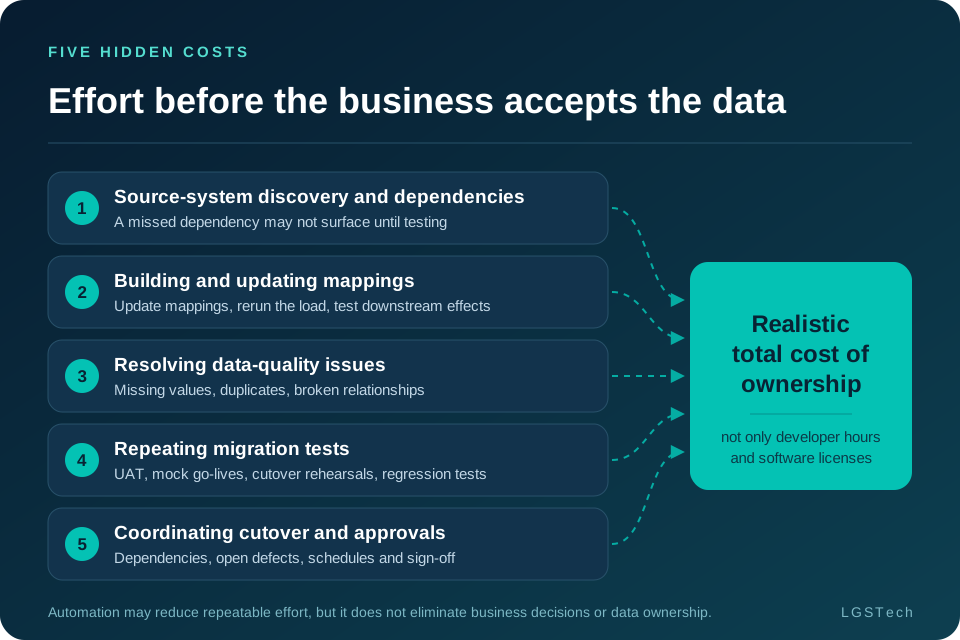
1. Source-system discovery and dependencies
Teams need to identify which data must move, where it resides, which source objects relate to one another, and what the target system requires. If a dependency is missed during discovery, the issue may not surface until testing—when fixing it can affect several mappings or migration sequences.
2. Building and updating mappings
Legacy data rarely matches the target structure without adjustment. Custom fields, financial dimensions, codes, and business rules may require transformation. When requirements change, teams may need to update mappings, rerun the load, and test the downstream effects.
3. Resolving data-quality issues
Missing values, duplicates, inconsistent formats, and broken relationships can stop records from loading or cause reconciliation issues. Someone must diagnose whether the source data, transformation logic, or target configuration is responsible, then correct the issue and validate the result again.
4. Repeating migration tests
User acceptance testing (UAT), mock go-lives, cutover rehearsals, and regression tests can require multiple migration runs. Automated scripts help, but preparing datasets, coordinating dependencies, checking record counts, and reconciling results still takes time.
5. Coordinating cutover and approvals
Data owners, functional teams, technical teams, and project managers must align on dependencies, outstanding defects, execution schedules, and sign-off. Limited visibility can create additional work as teams chase updates or investigate whether data is ready.
How to calculate ROI for Dynamics 365 data migration
A useful comparison applies the same scope, acceptance criteria, and labor assumptions to both options. The following example is illustrative only; it is not a reported LGSTech customer result or an industry benchmark.
| Cost item | Custom ETL | Automated migration |
|---|---|---|
| Delivery effort | 1,500 hours | 850 hours |
| Labor at $100/hour | $150,000 | $85,000 |
| Platform and setup cost | $0 incremental | $35,000 |
| Total modeled cost | $150,000 | $120,000 |
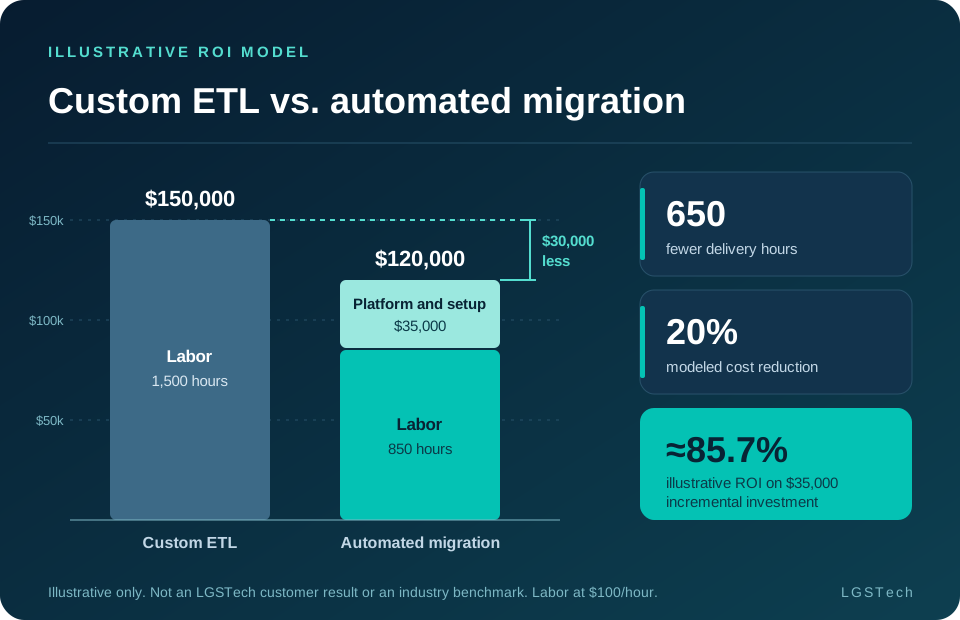
Under these assumptions, the automated approach uses 650 fewer delivery hours and costs $30,000 less overall. That is a modeled 20% cost reduction compared with the $150,000 custom ETL baseline.
The labor avoided is worth $65,000 (650 hours × $100). After subtracting the assumed $35,000 platform and setup cost, the net modeled saving is $30,000.
For clarity, the original draft described the $30,000 saving as “25% ROI.” Mathematically, $30,000 is 25% of the $120,000 automated-migration total cost, but that ratio is not the usual definition of ROI. If the $35,000 platform/setup cost is treated as the incremental investment and the $65,000 labor reduction as the gross benefit, a conventional incremental-investment calculation is:
Always label which formula you use. A decision-maker should be able to see the baseline, what counts as a benefit, what costs are included, and whether the comparison accounts for ongoing fees, training, maintenance, or changes in project scope.
When does migration automation break even?
A simple break-even estimate divides the incremental platform and setup cost by the fully loaded labor rate. If the incremental cost is $35,000 and labor is valued at $100 per hour, the project needs to avoid approximately 350 hours of effort to offset that cost, assuming other costs and benefits remain unchanged.
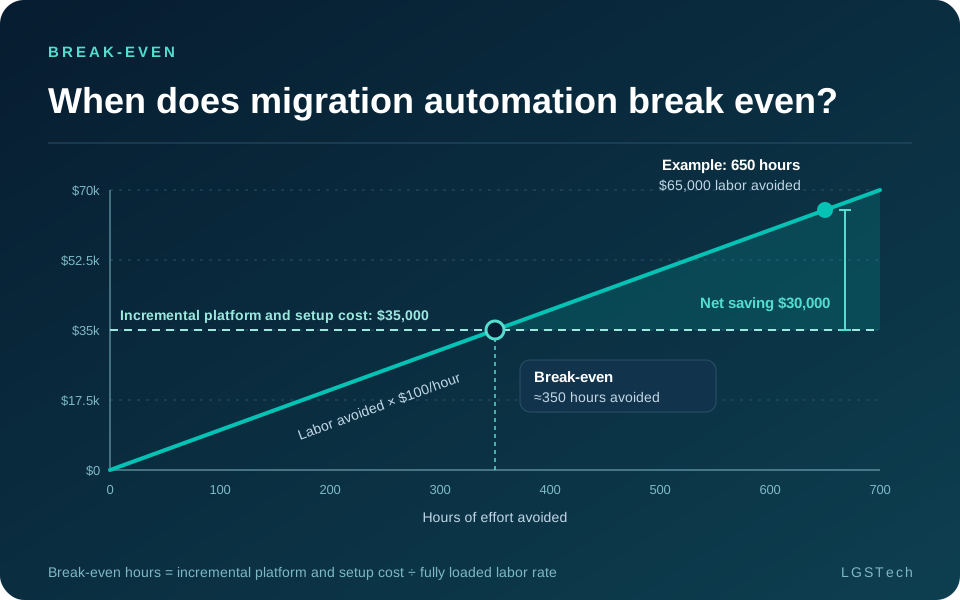
A small migration with few objects, limited transformations, and one test cycle may not generate enough repeatable work to reach that threshold. A complex ERP migration involving multiple legal entities, changing requirements, and repeated mock cutovers may have more opportunities to save effort. Calculate break-even using your own project scope before choosing a tool.
Where automated data migration can create the most value
Automation is most useful when it reduces tasks that teams otherwise repeat. Look for measurable improvements in areas such as:
- Source discovery: metadata-driven analysis may help teams understand source and target structures and identify dependencies earlier.
- Reusable mappings: proven transformation logic can reduce the need to recreate similar mappings, provided each new use is reviewed for the target project.
- Validation and reconciliation: consistent checks can help find missing values, invalid relationships, and other issues before a migration run is accepted.
- Repeatable test cycles: reusable workflows can reduce preparation and coordination across UAT, mock go-lives, and cutover rehearsals.
- Multi-entity or multi-customer deployments: repeatable practices can be especially useful for implementation partners and organizations rolling out Dynamics 365 across locations.
These are opportunities, not guaranteed outcomes. Measure the before-and-after effort and validate that the automation supports the specific data entities, transformations, and controls your project requires.
Five metrics worth tracking
| Metric | What it tells you |
|---|---|
| Cost per accepted migration object | The cost of preparing a data object that meets agreed business acceptance criteria. |
| Hours spent on rework | How much time is used to correct or rebuild mappings, transformations, and data. |
| Cost per test cycle | The cost of each migration rehearsal, including preparation, execution, reconciliation, and issue resolution. |
| Data readiness percentage | The share of in-scope data meeting defined validation and acceptance rules. |
| Critical defects before cutover | The number and severity of unresolved issues that could block a safe go-live. |
Track these measures against a consistent baseline. Reporting only the number of records loaded can obscure whether the business can actually use the data.
When custom ETL is still the right choice
A specialist migration automation platform is not necessary for every project. Existing tools may be the better option when:
- The migration covers a limited number of data objects and transformations are straightforward.
- Requirements are stable and only a small number of test or rehearsal cycles are expected.
- The organization already has reliable, reusable ETL pipelines and experienced developers.
- Existing Dynamics 365 data management capabilities meet the project’s validation, governance, and operational needs.
- The licensing, configuration, learning, and support costs of a new platform exceed the credible savings or risk reduction.
Do not invest in automation simply because it is more sophisticated. Invest when the additional capabilities deliver enough measurable value, visibility, or control to justify their cost.
ROI matters, but so do data privacy and control
A migration completed under budget can still create business risk if customer, supplier, financial, or inventory records are inaccurate after go-live. A successful data load is not the same as accepted, usable data. Data owners should validate results, understand exceptions, and approve business-critical decisions.
When AI is used to support migration, understand exactly what it can access and where processing occurs. Can the AI work with metadata—such as source and target structures, field definitions, and relationships—or does it need access to underlying business records? Also verify data residency, retention, access controls, logging, subprocessors, and how sensitive information is protected.
For projects involving personal data in Europe or regulated information in the United States, involve your privacy, security, and compliance stakeholders early and evaluate the requirements applicable to the specific data and jurisdictions. Automation should improve repeatability and visibility without removing accountable human review.
What should you look for in a Dynamics 365 migration automation platform?
Evaluate capabilities against a real migration scenario rather than choosing from a feature list alone. Ask vendors to demonstrate:
- How the platform discovers source and target structures and identifies dependencies.
- How mappings are created, versioned, reused, reviewed, and approved.
- How data-quality rules, validation outcomes, exceptions, and reconciliation are reported.
- How a migration can be repeated across environments and test cycles without rebuilding the workflow.
- What licensing, setup, training, integration, maintenance, and support costs apply.
- What data is available to any AI component, where it is processed, and what controls keep people responsible for critical decisions.
- How the vendor will measure value against your current approach using agreed project assumptions.
A credible business case should connect each proposed benefit to a measurable baseline, a project owner, and an agreed acceptance measure.
How LGSTech approaches automated data migration
At LGSTech, our data migration platform is designed to make enterprise migration more intelligent, repeatable, and easier to control. It uses metadata-driven AI to help teams understand source and target structures, identify relationships, and support migration decisions.
Teams can reuse proven migration logic from previous projects without copying the underlying customer data. Automated workflows support transformation, validation, testing, and loading into Dynamics 365.
Data privacy and human oversight are important parts of our approach. We have designed the platform so that business-data staging and transformation remain within the customer-controlled environment, while the AI layer works with metadata rather than underlying business records. Migration specialists remain responsible for reviewing and approving critical decisions.
The objective is not to replace migration expertise. It is to reduce repetitive effort and give teams a clearer view of what is ready, what needs attention, and what must be resolved before go-live.
Conclusion: Measure readiness, not just transfer speed
When comparing automated data migration for Dynamics 365 with custom ETL, look beyond the time required to transfer records. Include discovery, mapping changes, data cleansing, repeat testing, reconciliation, licensing, setup, and the work required to get data ready for business use.
For straightforward migrations, existing tools may be sufficient. For complex projects with frequent changes and repeated testing, automation may make a stronger business case—but the decision should rest on your actual costs, savings opportunities, controls, and delivery requirements.
The goal is not merely to get data into Dynamics 365 quickly. It is to help the business use that data confidently.
Request a Dynamics 365 Migration ROI AssessmentFrequently asked questions
Is automated Dynamics 365 data migration cheaper than custom ETL?
It can be, especially for complex transformations and repeated testing. Compare labor, licensing, setup, maintenance, rework, validation, and testing; existing tools may be cheaper for small, stable migrations.
Does Dynamics 365 already include data migration tools?
Yes. Dynamics 365 Finance and Supply Chain Management includes a Data Management Framework for data entities, staging, mapping, and import/export jobs. A specialist platform should demonstrate added value against project requirements.
What makes custom ETL migration expensive?
Costs often come from mapping updates, data-quality fixes, troubleshooting, test coordination, reconciliation, and script maintenance—especially when source data, target configuration, or business rules change.
How many test cycles make automation worthwhile?
There is no fixed number. Break-even depends on platform cost, labor rates, complexity, reuse, and effort saved per cycle. Estimate savings across planned rehearsals and compare them with the investment.
Can AI support data migration without accessing sensitive business records?
Depending on its architecture, AI may work with metadata instead of business records. Verify what it can access, where processing occurs, and which security and privacy controls apply.
What should CIOs measure to evaluate data migration ROI?
Track total delivery cost, rework hours, cost per test cycle, cost per accepted object, data readiness, and critical defects before cutover. Use a consistent baseline and document ROI assumptions.