

A Dynamics 365 implementation can be technically sound yet still fail to reach go-live because the underlying data migration is incomplete, unreliable, or poorly governed. When migration cycles repeatedly produce errors, reconciliation gaps, or missed milestones, restarting isn't always the answer. A structured Dynamics 365 data migration recovery approach can identify root causes, prioritize remediation, and restore a credible path to go-live.
The Short Answer
Dynamics 365 data migration recovery starts by diagnosing why a migration is failing rather than simply rerunning it. Teams should assess source data, mappings, transformation logic, testing, dependencies, and scope; prioritize critical issues; remediate and retest through controlled cycles; and establish measurable go-live criteria before production cutover.
Key Takeaways
- Diagnose the root cause before adding resources or accelerating migration cycles.
- Separate data-quality, mapping, transformation, technical, and governance issues.
- Reassess whether all historical data actually needs to be migrated.
- Prioritize business-critical data and defects rather than fixing everything simultaneously.
- Use repeatable mock migrations to measure whether remediation is working.
- Establish objective go/no-go criteria before production cutover.
- Decide objectively whether to recover, redesign, or restart the migration.
When Does a Dynamics 365 Migration Need Recovery?
Not every migration issue requires a recovery project. Isolated mapping errors or individual data-quality issues can generally be addressed within the existing migration workstream.
A formal recovery effort becomes appropriate when problems are systemic, such as:
- Repeated mock migrations fail
- Critical mappings remain unresolved
- Data-quality issues continue to surface
- Source-to-target reconciliation produces unexplained variances
- Manual intervention keeps increasing
- Migration milestones repeatedly slip
- Business users lose confidence in migrated data
- Go-live is approaching without agreed readiness criteria
The critical question is not "How can we migrate faster?"
It is:
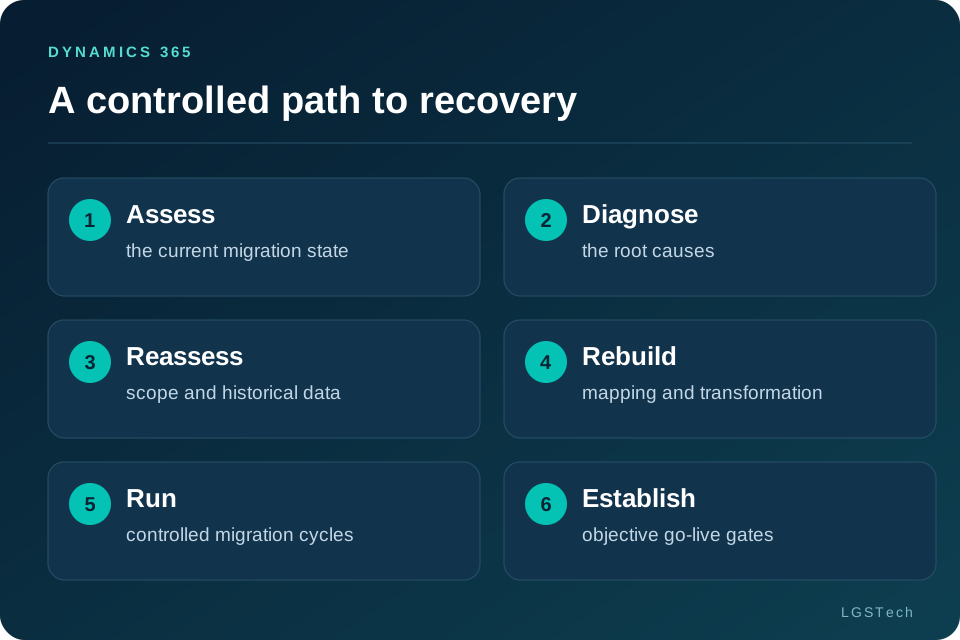
The 6-Step Dynamics 365 Data Migration Recovery Framework
1. Assess the Current Migration State
Begin with a fact-based assessment of where the migration actually stands.
Review:
- Source systems and data volumes
- Migration scope and entity inventory
- Source-to-target mappings
- Transformation rules
- Data-quality results
- Migration defects
- Mock migration results
- Reconciliation reports
- Testing and UAT status
- Remaining timeline and dependencies
Create a recovery dashboard showing what is complete, blocked, defective, or awaiting business decisions.
Output: Migration Recovery Assessment
2. Diagnose the Root Causes
A failing migration can have several underlying causes. Classify defects into five areas:
Source data: duplicates, missing values, invalid references, inconsistent formats, or obsolete records.
Mapping and transformation: fields without clear target equivalents, incompatible structures, or undocumented business rules.
Target environment: configuration, dependencies, reference data, or business-process differences affecting data loads.
Migration execution: manual extraction, inconsistent scripts, poor sequencing, or unreliable processes.
Governance: unclear ownership, changing requirements, unresolved business decisions, or inadequate approval processes.
For every critical issue, document:
This converts a large defect backlog into a controlled recovery plan.
3. Reassess Migration Scope and Historical Data
A troubled migration is rarely the right time to migrate everything.
Classify data into:
| Data category | Recommended approach |
|---|---|
| Critical master data | Cleanse, map, validate and migrate |
| Active transactions | Migrate according to operational requirements |
| Required historical data | Define specific migration requirements |
| Obsolete or low-value data | Consider archival |
Historical data deserves particular attention. Organizations may have years or decades of transactions, service records, inventory movements, or financial information.
Ask:
A well-defined archival strategy can reduce migration volume, transformation effort, and testing complexity.
4. Rebuild Mapping and Transformation
If mapping has become inconsistent, avoid continually patching individual errors.
Create a controlled source-to-target mapping framework covering:
- Source and target entities
- Field-level mappings
- Data types
- Transformation rules
- Reference-data dependencies
- Default values
- Validation rules
- Business ownership
- Approval status
Where legacy structures don't directly correspond to Dynamics 365, document the business rule governing the transformation and obtain business-owner approval.
This makes mapping repeatable, auditable, and easier to maintain across migration cycles.
5. Run Controlled Migration and Reconciliation Cycles
Recovery should follow a repeatable cycle:
Don't wait for the final migration to discover whether remediation works.
Prioritize testing around business-critical data such as:
- Customers and vendors
- Financial balances
- Inventory
- Open transactions
- Orders and invoices
- Critical historical records
Validation should include:
- Record-count comparison
- Field-level validation
- Referential-integrity checks
- Business-rule validation
- Financial reconciliation
- Exception analysis
- User acceptance testing
Every cycle should answer one question:
If not, return to the root cause rather than simply repeating the migration.
6. Establish Objective Go-Live Gates
A migration should not go live simply because the ERP implementation schedule demands it.
Define measurable go/no-go criteria, including:
- Critical mappings approved
- Data cleansing completed
- Migration scope signed off
- Mock migration successfully completed
- Data variances explained
- Financial balances reconciled
- Critical business processes validated
- UAT completed
- Critical defects resolved or formally accepted
- Cutover runbook approved
- Business owners provide sign-off
This gives the steering committee an objective basis for deciding whether the organization is genuinely ready.
Recover, Redesign or Restart?

A failing migration does not automatically require a restart.
| Situation | Recommended approach |
|---|---|
| Isolated data-quality problems | Recover |
| Incomplete mappings or transformation rules | Recover / Redesign |
| Repeated mock migration failures | Redesign |
| Weak testing or reconciliation | Recover / Redesign |
| Fundamentally flawed migration architecture | Restart |
| Existing migration assets are largely reusable | Recover |
Recover when the underlying approach is sound but execution has problems.
Redesign when critical components such as mapping, transformation, testing, or governance need to be rebuilt.
Restart only when the migration architecture or strategy is fundamentally incapable of delivering the required outcome.
A Practical 30-Day Recovery Framework
This framework can help organizations structure an initial recovery effort.
| Period | Focus | Key outputs |
|---|---|---|
| Days 1–5 | Assess | Recovery assessment and root-cause analysis |
| Days 6–10 | Prioritize | Critical data, defects and scope decisions |
| Days 11–20 | Remediate | Mapping, cleansing and transformation fixes |
| Days 21–25 | Validate | Mock migration and reconciliation results |
| Days 26–30 | Prepare | Cutover plan and go/no-go decision |
These are indicative planning ranges, not guaranteed delivery timelines. Enterprise migrations involving multiple source systems, complex customizations, high data volumes, or significant data-quality issues may require longer remediation and testing cycles.
What Drives the Cost of Migration Recovery?
Recovery cost depends largely on how much of the existing migration can be reused.
Key drivers include:
- Number of source systems
- Data volume and complexity
- Number of entities
- Data-quality remediation
- Mapping and transformation rework
- Customizations and integrations
- Remaining test cycles
- Cutover requirements
- Specialist resources
- Time remaining before go-live
Before deciding on a path forward, compare:
This provides a more objective basis for an investment decision.
What Migration Recovery Looks Like in Practice
Enterprise migration recovery often involves more than correcting individual data errors. LGSTech's experience across complex ERP modernization programs includes migrations where data transformation, historical records, entity relationships, testing, and cutover readiness can all influence migration outcomes.
For example, LGSTech has supported large-scale migration programs involving multiple legal entities and extensive data objects, where structured assessment, transformation, validation, and reconciliation are critical to maintaining data integrity.
The lesson: recovery should be treated as a controlled engineering and governance exercise—not simply an accelerated migration cycle.
Explore relevant LGSTech migration case studies to see how complex ERP data migration programs have been approached.
How LGSTech Supports Dynamics 365 Data Migration Recovery
LGSTech helps organizations assess and recover migration programs affected by data-quality issues, mapping gaps, testing failures, or approaching go-live deadlines.
Our capabilities include:
- Migration recovery and readiness assessment
- Legacy data discovery and profiling
- Data mapping and transformation
- Data cleansing and validation
- Migration automation
- Mock migration and reconciliation
- Cutover planning and hypercare
LGSTech supports complex ERP modernization initiatives including Dynamics AX to Dynamics 365, NAXT to NAXT 365, and Annata AX to Annata 365.
Explore Dynamics 365 Data Migration Services, Migration Advisory, and Data Migration Implementation.
For industry-specific migration requirements, visit LGSTech's Industries.
Is Your Dynamics 365 Migration at Risk?
Don't let recurring migration failures push your ERP go-live further off track.
Request a Migration Assessment to identify root causes, prioritize recovery actions, and establish a practical path to go-live.
Request a Migration AssessmentFrequently Asked Questions
What is Dynamics 365 data migration recovery?
Dynamics 365 data migration recovery is the structured process of diagnosing and correcting a failing or at-risk migration. It typically involves assessing the migration approach, identifying root causes, fixing data and mapping issues, retesting migration cycles, and establishing measurable go-live criteria.
When should we consider a Dynamics 365 migration recovery project?
Consider recovery when migration failures are recurring, reconciliation is unreliable, data quality remains unresolved, mapping continues to change, or the project is approaching go-live without confidence in the migrated data.
Can a failed Dynamics 365 data migration be rescued?
Yes. Many migrations can be recovered when the underlying target architecture and migration approach remain viable. The intervention may range from targeted data remediation to redesigning mapping, transformation, testing, or migration processes.
How long does Dynamics 365 data migration recovery take?
Recovery can take several weeks or longer depending on data volumes, source systems, migration complexity, data quality, remaining test cycles, and proximity to go-live. A recovery assessment provides a more reliable project-specific estimate.
Should all historical data be migrated to Dynamics 365?
Not necessarily. Historical data should be assessed against operational, reporting, audit, compliance, and business requirements. Some information may need to be migrated, while other records can be retained through an accessible archival strategy.
How do you validate migrated Dynamics 365 data?
Validation can include record-count comparisons, field-level checks, referential-integrity testing, business-rule validation, financial reconciliation, exception analysis, and user acceptance testing. Critical data should have defined acceptance criteria before production migration.
How do we decide whether to recover or restart a migration?
Assess the existing migration architecture, mappings, transformation logic, source data, testing process, and reusable migration assets. If the foundation is sound, recovery may be appropriate. If the underlying strategy is fundamentally flawed, redesign or restart may be necessary.